




Start With the Security Needs of Your Property
A useful CCTV system should help you see what is happening in the areas that matter most. Simply installing more cameras does not guarantee better surveillance. Their positions, viewing angles and recording quality determine how useful the footage will be.
For example, a homeowner may want to monitor the main entrance and parking area, while a shop owner may need a clear view of the entrance and billing counter. An office with several floors may require a different arrangement altogether.
Before purchasing equipment, identify the areas you want to monitor and consider what you need to see in the recordings. Do you need to observe general movement, capture faces near an entrance or monitor activity around valuable equipment? The answers will help determine the appropriate camera type, placement and number of devices.
A simple floor plan with proposed camera positions can help you identify coverage gaps before installation begins.
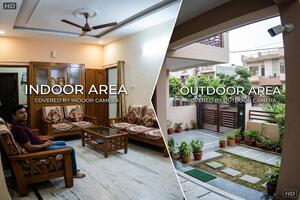
Indoor CCTV Installation: Getting Clear Views Inside the Property
Indoor cameras are commonly used in hallways, reception areas, staircases, shops and shared workspaces. Their placement should reflect the purpose of monitoring each area.
Choose the Right Viewing Angle
A camera covering a doorway should capture people approaching and passing through it. A camera overlooking a billing counter, meanwhile, needs an angle that provides a useful view of activity at the counter.
Check the proposed position before drilling holes. Doors, cupboards, furniture and partitions can obstruct the image, while a camera mounted too high may capture the tops of people's heads rather than useful facial details.
Manage Light From Windows and Indoor Fixtures
Bright windows behind a person can make their face appear dark. Reflective glass and strong artificial lighting can also affect image quality.
Where possible, avoid pointing cameras directly towards bright windows. If the lighting cannot be changed, ask the installer whether a camera with wide dynamic range (WDR) would be suitable.
Keep Indoor Monitoring Appropriate
Place cameras in areas where surveillance serves a legitimate security purpose. Avoid unnecessary monitoring of private spaces, and consider applicable privacy and workplace requirements when installing cameras in offices or shared buildings.
Outdoor CCTV Installation: Planning for Weather and Exposure
Outdoor cameras need to withstand environmental conditions while capturing useful footage of entrances, driveways, parking areas and other exposed locations.
Select Suitable Outdoor Equipment
Check the camera's ingress protection (IP) rating and suitability for the expected exposure to dust and water. Mounting brackets, connectors and cable entry points also need appropriate protection.
Ask the installer how cables will be routed and secured. Poorly protected connections can cause faults even when the camera itself is weather-resistant.
Check Night-Time Visibility
A camera that looks clear during the day may struggle after sunset. Headlights, nearby walls and reflective surfaces can interfere with infrared illumination, while poor lighting can make people difficult to identify.
Review sample footage or test the actual camera after dark. Pay attention to the distance at which faces and other important details remain visible.
Consider Access for Maintenance
Outdoor cameras may need periodic cleaning, especially when exposed to dust or positioned near busy roads. Choose mounting positions that allow safe maintenance and avoid locations where trees, plants or parked vehicles are likely to block the view.
For cameras installed at height or near electrical connections, use a qualified installer rather than attempting risky maintenance yourself.
How Many Cameras Do You Need: 2, 4 or 8?
The right camera count depends on the property's layout and the areas requiring surveillance. A small property with two important access points may need only two cameras, whereas a larger premises may require separate coverage for several rooms and entrances.
A 2-Camera Setup for Essential Coverage
A two-camera system may suit a compact apartment, kiosk, small shop or office with limited surveillance requirements.
For example, one camera could cover the main entrance and the other could monitor a billing counter or parking area. This works best when the property has a simple layout and the two cameras can capture the priority areas effectively.
If the property has multiple entrances, separate floors or several areas that need close monitoring, two cameras may leave important gaps.
A 4-Camera Setup for Small Homes and Businesses
Four cameras can offer a useful balance for an independent home, small retail shop or compact office.
A possible arrangement for a house might include:
-
One camera at the main gate or entrance.
-
One camera covering the parking area.
-
One camera monitoring an important passage or staircase.
-
One camera covering a rear entrance or another vulnerable location.
For a shop, the cameras could instead cover the entrance, billing counter, sales area and stockroom access.
The arrangement should follow the property's layout rather than a fixed template. If two cameras already provide adequate coverage, adding two more may not offer enough additional value to justify the cost.
An 8-Camera Setup for Larger Properties
Eight cameras may be suitable for larger homes, showrooms, warehouses, multi-floor offices and commercial premises with several separate areas to monitor.
A business may need distinct views of entrances, reception, inventory areas, corridors and loading access. A larger house may require coverage of the gate, driveway, side entrance, rear access and selected indoor areas.
Before selecting this setup, confirm that the recorder supports the required number of cameras and that storage, network capacity and power arrangements can support the complete system.
An eight-camera package is not automatically better than a four-camera system. The additional cameras should cover areas that genuinely need surveillance.
Comparing the Three Setups
| Camera count | Potentially suitable for | Main consideration |
| 2 cameras | Compact flats, kiosks and small offices | Cover the highest-priority areas |
| 4 cameras | Small independent homes, shops and offices | Balance entrance and internal coverage |
| 8 cameras | Larger homes, showrooms and commercial premises | Plan separate coverage zones and sufficient recording capacity |
These are general examples, not strict rules based on property size. The final camera count should be decided after reviewing the layout, viewing distances and surveillance requirements.
What to Consider When Arranging CCTV Installation in Different Cities
Property types, building layouts and installation conditions can influence the choice of equipment and camera positions. The following points highlight considerations worth discussing with a local installer.
Delhi: Homes, Shops and Properties Near Busy Roads
When evaluating CCTV Camera Installation Services in Delhi, consider whether dust, vehicle movement and exposed outdoor locations could affect the proposed camera positions.
For properties near busy roads, check that passing vehicles and roadside activity do not dominate the footage intended for your entrance or parking area. Apartment residents should also confirm building-society rules before installing cameras in shared corridors or routing cables through common spaces.
Bangalore: Rain Exposure and Multi-Storey Properties
When comparing CCTV Camera Installation Services in Bangalore, pay attention to outdoor cable protection and the suitability of cameras exposed to rain.
Multi-storey homes and offices may need a planned cable route between floors. If you prefer Wi-Fi cameras, test the signal at the intended mounting points, as walls and distance can affect connectivity.
Chandigarh: Entrance and Boundary Coverage
When considering CCTV Camera Installation Services in Chandigarh, review how the system will cover the property's entrance, driveway and other relevant access points.
Homes with front and rear access may need separate camera views. Outdoor mounting positions should also allow routine cleaning and remain suitable for the expected seasonal weather.
Gurgaon: Apartments, Offices and Commercial Buildings
Before choosing CCTV Camera Installation Services in Gurgaon, establish whether the installation is for a private apartment, an office floor, a shop or a larger commercial property.
In apartment complexes and commercial buildings, permission for drilling, common-area cabling and camera placement may be necessary. Larger office installations should also account for the recorder capacity and network requirements of the planned system.
Meerut: Matching the Setup to Local Property Layouts
When comparing CCTV Camera Installation Services in Meerut, consider how the layout of your home or business affects camera placement.
For shops, the entrance and billing counter may be priorities. For independent houses, the gate, driveway and rear access may deserve more attention. An itemised quotation can help you determine whether a proposed package covers these areas without unnecessary equipment.
Compare Installation Quotations Before Confirming
Once you know the areas to monitor and the approximate number of cameras required, compare quotations based on the same requirements.
Check the following details:
-
Equipment: Camera models, resolution, recorder specifications and storage capacity.
-
Installation work: Labour, cable length, connectors, mounting hardware and configuration.
-
Additional charges: Concealed wiring, drilling, conduit, high mounting positions and other site-specific work.
-
Recording requirements: Expected storage duration and the settings used to estimate it.
-
Warranty: Coverage for equipment and workmanship, including the process for requesting repairs.
-
Remote access: Whether mobile app configuration is included and what internet connection is required.
Be careful with vague promises such as “complete installation” or “all accessories included.” Ask for an itemised quotation and written confirmation of any additional work that may incur charges.
The cheapest quotation may not offer the best value if it includes less storage, unsuitable equipment or incomplete installation work. Compare the full scope before deciding.
Check These Details Before Accepting the Installation
Before the installer leaves, test the system rather than relying only on a demonstration of the live camera views.
-
Review each camera's view. Confirm that the intended area is visible and that important details are not blocked.
-
Check recording and playback. Make sure footage is being saved and can be reviewed.
-
Test night-time performance. Review the image under the lighting conditions in which the cameras will be used.
-
Confirm mobile access. If remote viewing is included, check that the app works and that access is configured securely.
-
Keep the documentation. Save the invoice, equipment details, warranty information and relevant support contact details.
These checks can reveal installation problems before they become more difficult to resolve.
Maintaining Your CCTV System After Installation
A CCTV system requires occasional attention to remain useful. Dust on lenses, loose connections, storage-drive problems and software issues can affect performance over time.
Clean the lenses carefully, inspect exposed equipment periodically and check that recordings can be played back. If vegetation, new furniture or other changes obstruct a camera's view, reassess its position.
Use strong, unique passwords, restrict access to authorised users and keep the camera or recorder software updated when appropriate. Secure remote access rather than sharing login details unnecessarily.
Regular checks help you identify problems early and maintain the quality of your surveillance footage.
Final Thoughts
Choosing a CCTV system is about finding the right balance between coverage, recording quality and cost. Two cameras may be sufficient for a compact property, four may suit a small home or business, and eight may be appropriate for larger premises with several distinct monitoring areas.
Before confirming an installation, identify your priority locations, select suitable equipment and compare complete quotations. Whether you are arranging CCTV installation in Delhi, Bangalore, Chandigarh, Gurgaon or Meerut, a clear plan will help you avoid unnecessary expenditure and achieve more useful coverage.