



Dome CCTV Camera Guide: How to Choose the Right Model for Your Space
A dome CCTV camera is a popular choice for monitoring homes, shops, offices, reception areas and other indoor spaces. Its rounded cover gives it a neat appearance, while the compact design makes it easy to install on ceilings and suitable walls. Depending on the model, it can provide night vision, motion alerts, audio recording and remote viewing through a mobile phone.
However, not every dome camera offers the same picture quality, viewing angle or recording options. Some work with a DVR, others connect through a network, and certain models support Wi-Fi or a SIM card. Understanding these differences can help you choose a camera that suits your space without spending more than necessary.
What makes this camera design useful for everyday security?
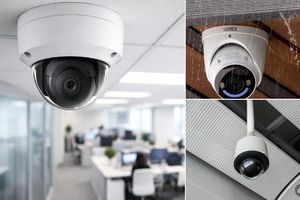
The rounded housing is one of the most recognisable features of a dome camera. It protects the camera's internal components and creates a relatively discreet appearance compared with the more noticeable shape of a traditional bullet camera.
These cameras are commonly installed in places where people need to monitor activity without making the equipment too prominent. For example, a shop owner may place one above the billing counter, while a homeowner may install it in a living room or near an entrance.
Another advantage is the range of available models. Budget-friendly options can cover basic monitoring needs, while advanced versions offer higher resolution, improved low-light performance, audio features and network connectivity.
The right choice depends on what you want to monitor, how clearly you need to see it and how you plan to store the footage.
Where can this type of camera be installed?
Dome cameras are particularly useful in areas where a wide view of everyday activity is more important than long-distance monitoring.
-
Homes and apartments: Monitor living areas, entrances, hallways and indoor common spaces.
-
Retail shops: Keep an eye on billing counters, shelves, customer movement and cash-handling areas.
-
Offices: Monitor reception desks, corridors, meeting areas and shared workspaces.
-
Clinics and small commercial premises: Observe entry points and public-facing areas, while respecting private spaces.
-
Schools and residential buildings: Cover suitable common areas, such as corridors and reception zones, with appropriate privacy safeguards.
A dome model can also work outdoors, but only if it is designed for the conditions where it will be installed. A standard indoor camera should not be exposed to rain, dust or direct weather simply because its housing looks enclosed.
For gates, long driveways, large open grounds or distant objects, a bullet camera or a specialised zoom camera may be a better option. The important consideration is not just the camera's shape, but whether its lens, image quality and weather protection suit the job.
What are the main types available, and how do they differ?
Dome cameras come in several configurations. Understanding the differences is more useful than choosing a model based only on its appearance.
Fixed dome cameras: These monitor a particular direction once installed. They are suitable for billing counters, reception areas, entrances and rooms where the camera does not need to move.
Night-vision dome cameras: These use infrared illumination or other low-light technology to record when the surroundings become dark. Depending on the model, nighttime footage may be black and white or in colour.
IP dome cameras: These send video over a network and can be connected to a compatible network video recorder (NVR) or other supported recording arrangement. Some models also allow remote viewing through an app.
Vandal-resistant dome cameras: These have reinforced housings designed to better withstand tampering or impact. They can be useful in public-facing commercial areas, provided the model has the appropriate protection rating.
Panoramic or fisheye dome cameras: These use specialised lenses to capture a very wide view. The resulting image may look curved, and some software can correct the distortion.
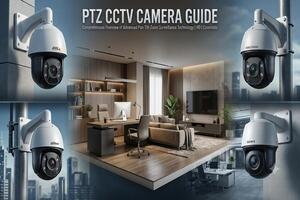
Motorised pan-tilt-zoom (PTZ) cameras: These can move in different directions and, on supported models, zoom in on selected areas. They are more specialised than fixed cameras and may cost considerably more.
Choose the type according to the monitoring requirement. A fixed camera may be sufficient for a small shop, while a large commercial site may need a combination of fixed and motorised cameras.
What does the full form mean, and what are the typical dimensions?
CCTV stands for Closed-Circuit Television. It refers to a video surveillance system in which footage is transmitted to selected recording or viewing devices rather than broadcast publicly.
The phrase dome camera describes the camera's physical design, not a separate CCTV technology. A dome camera can use analogue or network-based technology, depending on the model.
There is no universal size for these cameras. Compact indoor models may measure roughly 9–12 cm across, while other models can be larger because of their lens, housing or motorised mechanism. These are only general examples; actual dome camera dimensions vary by product.
Before buying, check the manufacturer's measurements and mounting requirements. This is especially important when fitting a camera into a narrow ceiling space, under a low roof or near a decorative fixture.
How do resolution and image quality affect the footage?
Resolution indicates how much visual detail a camera can capture. Common options include 2MP, 4MP and 5MP, with higher-resolution models generally capturing more image detail under suitable conditions.
A 2MP camera records Full HD video and can be sufficient for a small room, corridor or basic shop monitoring. A 4MP or 5MP model may be more useful when you need to inspect details in a larger scene or crop part of the recorded image.
However, megapixels alone do not determine how useful the footage will be. Lens quality, lighting, camera position, compression and the distance between the camera and the subject all matter.
For example, a well-positioned 2MP camera may provide a more useful view of a nearby doorway than a poorly positioned 5MP camera mounted too high or facing a bright window.
Approximate camera-only prices:
-
Basic 2MP dome camera: ₹800–₹1,800
-
4MP dome camera: ₹1,500–₹3,500
-
5MP dome camera: ₹1,800–₹4,500
These are budget-oriented estimates for selected models, not guaranteed prices. Premium IP cameras, advanced low-light models and branded products may cost more.
How should you understand viewing angle, recording range and 360-degree coverage?
Three terms are often confused when comparing cameras: viewing angle, range and 360-degree coverage. They describe different things.
Viewing angle refers to how much of the scene the lens can capture from its position. A wider angle can show more of a room, but it may make distant objects appear smaller. A narrower angle captures a smaller portion of the scene and can be useful when monitoring a particular point.
The dome CCTV camera viewing angle depends on the lens and camera design. A wider lens may work well for a small shop or living room, whereas a focused view may be preferable for a doorway or counter.
Recording range can refer to the distance over which a camera's infrared lights can illuminate a scene at night. A model advertised with a 20-metre night-vision range does not necessarily produce clearly identifiable faces at that distance. Lighting, weather, subject movement and lens quality affect the result.
360-degree coverage needs careful interpretation. A fisheye camera may capture a panoramic view from a fixed position, although the image can be distorted around the edges. A motorised camera may rotate to different positions, but that does not always mean every direction is recorded simultaneously. Its coverage depends on how it moves and how recording is configured.
If you are comparing a dome CCTV camera 360 model with a standard fixed camera, ask whether the stated coverage is panoramic, motorised or simply a wide-angle view. That distinction matters more than the number in the product title.
What is the difference between wired, wireless, Wi-Fi and SIM-based models?
Connectivity determines how the camera sends video, how you access it and what infrastructure it needs.
Wired cameras: These commonly use coaxial cable with a compatible DVR or network cable with an NVR or network system. They can be a practical choice for continuous monitoring, especially when several cameras need to be connected to one recorder.
Wireless dome cameras: These transmit footage wirelessly, usually over Wi-Fi, rather than using a video cable for that connection. They still need a power source unless they have a suitable battery or solar arrangement. Some models require a memory card, recorder or cloud service for storage.
Wi-Fi cameras: These connect to a compatible wireless network. Remote viewing normally requires an internet connection and a supported app or service. A Wi-Fi camera may continue recording locally during an internet outage if its hardware supports local storage, but remote access may be interrupted.
SIM-based cameras: A dome CCTV camera with SIM card support uses a compatible cellular network for connectivity. It may be useful at a location without reliable Wi-Fi, provided mobile signal and a suitable data plan are available. Not every dome camera accepts a SIM card, and the model must explicitly support cellular connectivity.
Budget estimates for selected models are:
-
Basic wired dome camera: ₹800–₹1,800
-
Wi-Fi dome camera: ₹1,500–₹3,500
-
SIM/4G-enabled dome camera: ₹2,500–₹5,000+
These ranges are indicative. Advanced dual-lens, motorised, weatherproof or high-resolution models can cost more. Also check whether the price includes a memory card, power adapter, cloud subscription or SIM data plan.
Which extra features are worth paying for?
Additional features can improve convenience, but not everyone needs all of them. Prioritise the features that solve a real monitoring problem.
Night vision: Useful for rooms, shops and entrances that become dark after closing time. Compare the type of night vision and the practical illumination distance rather than relying on the label alone.
Motion detection: Can trigger notifications or event-based recordings when movement is detected. More advanced models may distinguish people from other movement, reducing unnecessary alerts.
Built-in microphone: Records sound along with video when the model supports audio recording. If audio is important, confirm that the camera and recorder both support the required function.
Two-way audio: Lets users listen and speak through the camera using a compatible app. This is different from a camera that only records sound.
Mobile viewing: Allows you to check live footage or supported recordings remotely. Check app compatibility, user permissions and internet requirements before purchasing.
Weather and impact protection: Important for cameras exposed to rain, dust or possible tampering. Check the product's stated protection rating instead of assuming every dome housing is weatherproof.
A basic camera with reliable footage and suitable storage can be a better purchase than a feature-rich model whose extra functions you will rarely use.
What should you know about audio recording and voice features?
The phrase dome CCTV camera with voice recorder can refer to different capabilities. Some models have a built-in microphone that captures sound, while others support two-way audio so that a user can speak through the camera.
Before buying, confirm whether audio is actually recorded, whether it can be stored with the video and whether the compatible DVR, NVR or app supports it. A microphone-equipped camera does not automatically guarantee audio recording in every setup.
Audio also raises privacy considerations. Inform people where appropriate, avoid monitoring private spaces and follow applicable rules for recording conversations and workplace surveillance.
What are the differences between Hikvision and CP Plus models?
Hikvision and CP Plus offer multiple camera ranges, including dome-style products. The best option depends on the specific model and the recording system you intend to use.
A dome CCTV camera Hikvision model may be worth considering when its resolution, night-vision performance, audio support and recorder compatibility match your requirements. Similarly, a dome camera CP Plus model may be suitable for a home or small business if its features and price fit your budget.
For a fair comparison, check these details:
-
Resolution and lens specifications
-
Indoor or outdoor suitability
-
Night-vision performance
-
Microphone or two-way audio support
-
Compatibility with your existing DVR, NVR or network
-
Warranty, service support and included accessories
Do not assume that all cameras from one brand work with every recorder, or that a higher price automatically means better footage. Verify compatibility and compare equivalent models before making a decision.
What is the approximate price, and how much should you budget for installation?
The dome CCTV camera price depends on the camera's technology, resolution, lens, housing, connectivity and extra features. The following ranges are intended for initial budgeting in India and focus on lower-cost options where available.
| Camera category | Approx. camera-only price |
| Basic 2MP analogue dome | ₹800–₹1,800 |
| 2MP dome with microphone | ₹1,200–₹2,500 |
| 4MP dome | ₹1,500–₹3,500 |
| 5MP dome | ₹1,800–₹4,500 |
| Wi-Fi dome camera | ₹1,500–₹3,500 |
| SIM/4G-enabled dome camera | ₹2,500–₹5,000+ |
| Advanced vandal-resistant or motorised model | ₹4,000–₹12,000+ |
Prices are approximate and vary by seller, brand, warranty and specification. Some branded or specialised models will fall outside these ranges. Published price guides and retail listings also show substantial differences between basic cameras and advanced IP or motorised systems. <Cite refs={["turn251110search0","turn251110search1","turn251110news9"]}/>
Installation and complete setup costs
The camera itself is only one part of the expense. A wired system may also require a DVR or NVR, hard drive, cables, connectors, power supply and labour. A network-based system may need compatible network equipment, while a SIM camera may require a data plan.
| Setup | Approximate budget |
| One basic camera with straightforward fitting | ₹1,500–₹3,500 |
| Two-camera basic setup | ₹4,000–₹8,000 |
| Four-camera wired home or shop setup | ₹9,000–₹18,000 |
| Eight-camera basic commercial setup | ₹18,000–₹35,000+ |
These are broad planning estimates, not fixed quotations. The final amount may be higher if you choose advanced cameras, larger storage, extensive wiring, difficult mounting locations or additional networking equipment. Published installation guides likewise show that the camera count and infrastructure can change the total substantially.
For example, a single Wi-Fi camera may be an economical way to monitor one room, while a four-camera wired system can be more practical for a shop that needs continuous recording across several areas.
Before approving a quote, ask the installer to separate the camera price, recording equipment, storage, accessories, installation labour and any recurring charges. This makes it easier to compare offers fairly.
How can you select a suitable model for your home, shop or office?
Start by identifying the area you need to monitor and the details you expect to see in the recording. This will help you avoid paying for specifications that do not improve your actual use.
For a small room or apartment, a basic fixed dome or Wi-Fi camera may be sufficient. If you need to monitor a shop counter, choose a position and lens that show transactions clearly without leaving important areas outside the frame. For a larger office, multiple cameras may provide more reliable coverage than one wide-angle camera.
Before purchasing, consider the following:
-
Area to be covered: Identify entrances, counters, corridors and other priority locations.
-
Required image detail: Decide whether basic activity monitoring is enough or whether you need finer detail.
-
Lighting conditions: Check how the camera performs in darkness, backlighting and bright sunlight.
-
Connectivity: Confirm whether you need wired recording, Wi-Fi access or cellular connectivity.
-
Storage: Decide whether you need continuous recording, event-based recording or cloud access.
-
Installation conditions: Check mounting height, available power, cable routes and outdoor exposure.
-
Budget: Compare the complete setup rather than choosing solely by the camera's advertised price.
A useful camera is one that reliably captures the scene you need—not necessarily the model with the most features.
What should you check before and after installation?
Good installation has a direct effect on how useful the recorded footage will be. Even a high-resolution camera can produce poor results if it faces glare, is mounted at an unsuitable angle or leaves an important area hidden.
Before installation, confirm the field of view and ensure the mounting position is appropriate. Avoid pointing the lens directly at bright lights or windows where possible. For outdoor use, select a model rated for the actual exposure and use suitable fittings.
After installation:
-
Check live footage during both daytime and nighttime conditions.
-
Test playback to confirm that recordings are being saved correctly.
-
Verify remote access and motion alerts if the camera supports them.
-
Clean the lens cover with a suitable soft cloth when needed.
-
Change default passwords and use strong, unique account credentials.
-
Install firmware updates from the manufacturer when available.
-
Review recording retention and user access periodically.
If the system uses a memory card, DVR or NVR, confirm that the storage device is compatible and has enough capacity for your recording requirements. Cloud recording, where offered, may also involve recurring fees.
What buying mistakes can lead to extra costs or poor footage?
One common mistake is choosing a camera based only on megapixels. Higher resolution can help, but it cannot compensate for poor placement, weak lighting or an unsuitable lens.
Another is assuming that every dome camera offers 360-degree coverage. Many fixed models point in one direction, so the required area should be checked before installation.
Buyers also sometimes confuse wireless connectivity with battery operation. A Wi-Fi camera may still need continuous power, and remote viewing can depend on a working internet connection. Similarly, a SIM-enabled model needs cellular support, adequate signal and potentially a paid data plan.
Other issues worth avoiding include:
-
Buying an indoor camera for an exposed outdoor location.
-
Assuming the advertised night-vision range guarantees clear identification at that distance.
-
Purchasing a camera without checking recorder compatibility.
-
Forgetting the cost of storage, cabling, power supplies or installation.
-
Overlooking warranty terms, software support and account security.
-
Installing cameras where they unnecessarily capture private spaces.
Taking a little time to check these points can prevent avoidable expenses and disappointment later.
Final checklist before choosing your camera
Before placing an order, make sure you can answer these questions:
-
Does the camera cover the area I need to monitor?
-
Is its resolution suitable for the level of detail I expect?
-
Will it work in the lighting and weather conditions at the installation site?
-
Does it support the connectivity and recording method I need?
-
Are audio, motion alerts or remote viewing genuinely necessary for my use?
-
Is it compatible with my existing equipment, if any?
-
Have I budgeted for storage, accessories and installation?
-
Are the warranty and privacy arrangements clear?
A dome CCTV camera can be an effective choice for home and commercial monitoring when its design and features suit the location. Compare the actual specifications, confirm compatibility and consider the total cost before deciding. A well-chosen basic model can meet everyday security needs without requiring an unnecessarily expensive setup.